
Adding/Subtracting Matrices using EXCEL
Adding/Subtracting Matrices using EXCEL
In EXCEL, to add or subtract two matrices, you must first input the original matrices (shown in the top diagram as A and B). The matrices must have the same dimensions. In this example they are each 3x2; that is, three rows and two columns..
Matrices are added/subtracted by adding/subtracting respective entries occupying similar positions in each matrix. In our example, 5 + (-11) = -6, the top left entry in the result. EXCEL will allow you to do all the calculations very quickly,
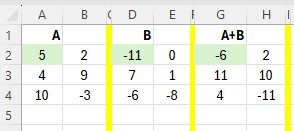
First choose the location in which you want to produce your result. For A+B, I highlighted the region G2:H4. The : tells EXCEL to use the area starting in cell G2 and ending in cell H4 to display the result.
Next you type in the formula that will perform the requested addition/subtraction. In G2 type in =A2:B4+D2:E4 This formula tells EXCEL to add(+) the region A2:B4 to the region D2:D4. To subtract the matrices, you would replace the add(+) with a minus(-) as shown in J2.

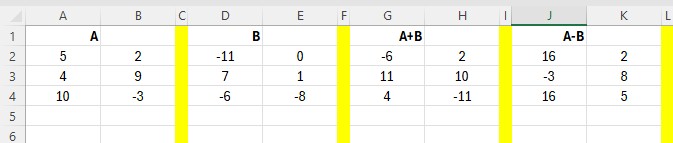
You can easily mentally confirm that the entries in A+B and A-B are correct.
The value of EXCEL is that it can add/subtract larger matrices very quickly and accurately.
Copyright 1997-1999: html adaptation
Career Connection to Teaching with Technology